
Product
From strategy to setup, in one place.
Kleardata keeps what marketing intends in one place and makes sure every tool downstream is set up to match. Here is each part, in the order you meet it.
Smart defaults
Start from a starter strategy, not a blank sheet.
Choose the closest of 12 business models. Kleardata seeds the marketing stages, lifecycle stages, audiences, conversion events, objectives and a starter strategy, plus the asset slots each channel needs. Nothing you have already set is overwritten, and everything stays editable.
Teams that skip a standard end up inventing channel, stage and audience values from scratch, then drifting within a quarter. A shared starting point is what prevents that.

Strategy and coverage
A strategy the plan is checked against.
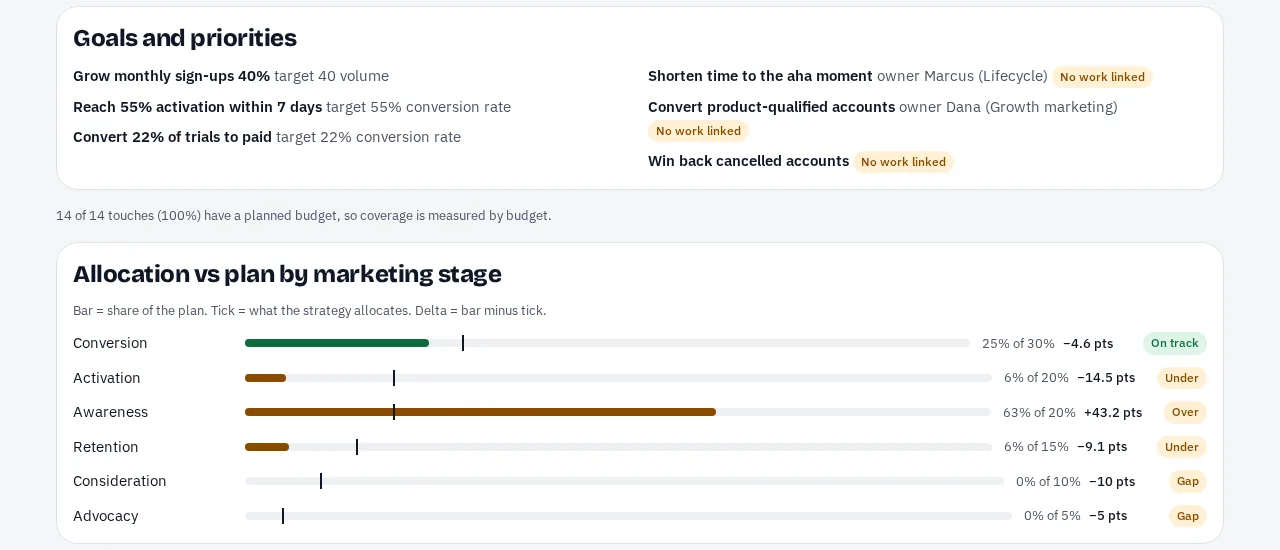
A strategy states, for a period, what you are trying to achieve and how effort splits across marketing stages, audiences, channels and markets. Plans attach to it, and the coverage check flags four kinds of problem:
- Missing coverage. The strategy puts 20% into retention and the plan has none.
- Off-strategy activity. 30% of planned budget sits in awareness against a 20% allocation.
- Unowned priorities. A priority has no campaign attached.
- Odd pairings. Awareness aimed at active customers gets a gentle flag, because sometimes that is a feature launch.
Two separate ideas keep this honest: marketing stage is what you do, and lifecycle stage is who you do it to. Audiences are labels with intent (lifecycle stage, value tier, attributes, targeting method and deal state), not segment logic.
The plan
Program to version, on a calendar.
Plans follow one hierarchy: program, campaign, initiative, unit, touch, version (a touch is one ad, email or message; a version is a creative variant of it). Flights and waves give each touch its time axis, and tests and planned budget live in the same tree. Values inherit down the tree, so you set a market or an objective once.
- Edit in the app, or build through your assistant or the API: draft a whole program in one message, expand a grid of audiences by markets, or clone last year's program with dates shifted.
- Required fields come from your own rules. Unusual-but-valid combinations warn; only structural errors block.
- The campaign map and timeline show the whole plan, with creative readiness on every touch.

In market
The plan everyone can see.
Each touch carries a status and an asset status, with the copy, links and thumbnails that let people see the marketing itself.
- Proposed
- The touch lives in an open agency proposal.
- Planned
- Published, not yet built.
- Scheduled
- Marked built; the flight has not started.
- Live
- Marked built, and today is inside its flight or wave.
- Ended
- Marked built, and the flight is over.
These are states of the plan, not tasks. Only one thing is set by hand, whether a touch is built, and everything else is derived from the plan and its dates.

Publish and IDs
Every deployable touch gets one ID.
Publishing mints a kd_ ID for each deployable touch (one per wave, when a touch runs in waves), with a name that fits the channel and a tagged link that carries the ID. IDs are seven characters from an alphabet chosen to avoid look-alikes, so they survive being read aloud and typed into a platform.
Because the meaning lives in the registry and not in the string, you can add a dimension or fix a typo without re-tagging anything that is already live.
- Preview shows every placeholder, name and link before anything is minted.
- The audit view finds live names that do not carry an ID yet.
- Bulk work happens in a draft plan, and IDs are only minted when it is published.

What changes
What changes, and for whom.
Whoever builds
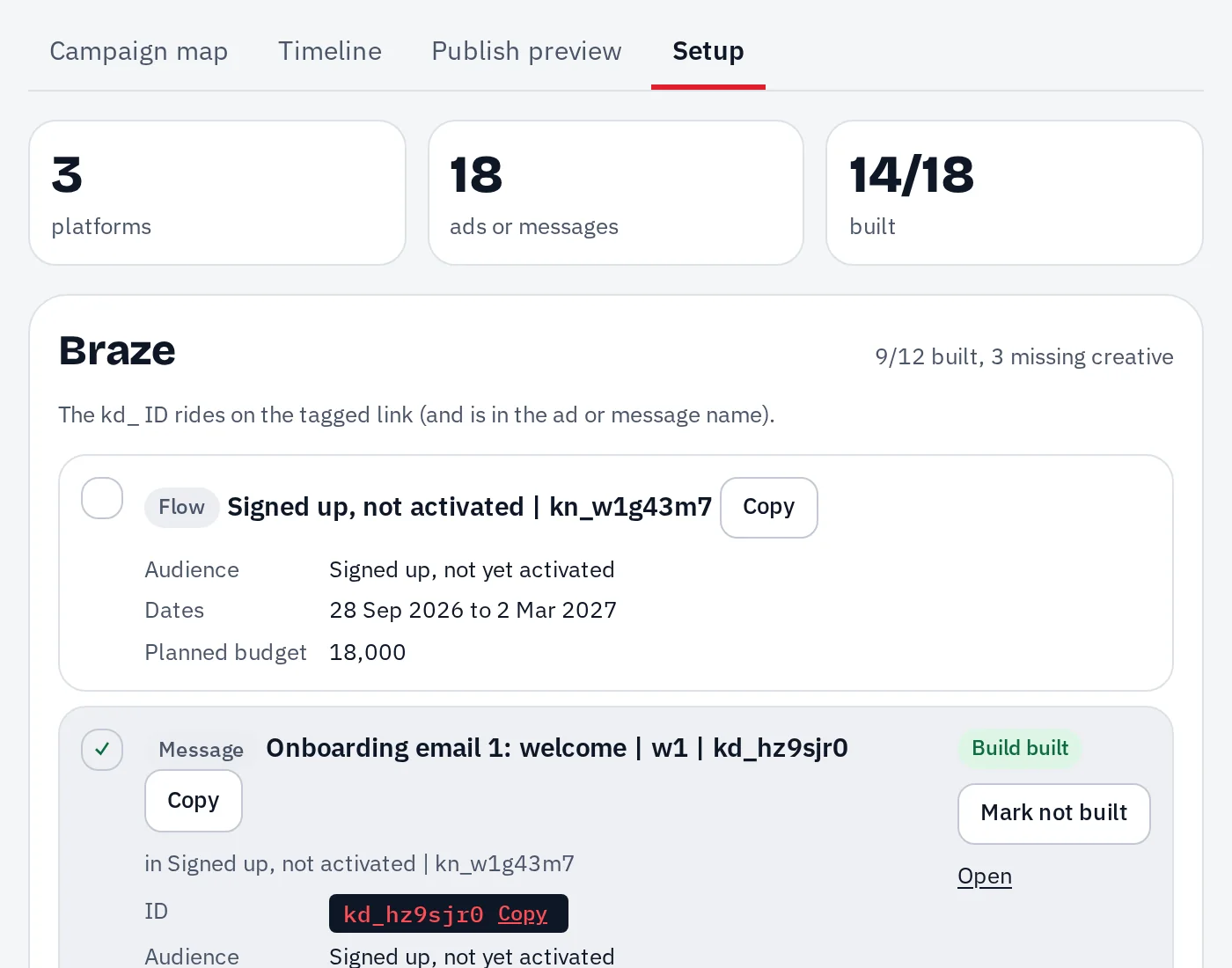
Pastes the name and link from the setup checklist and marks the touch built.
Agencies
Draft in your workspace instead of sending a deck.
Your data team
Loads one nightly file and installs a dbt package. Your warehouse never opens to us.
Nothing else moves. If people skip the IDs, the audit view finds live names that do not carry one.
Channels and platforms
12 channels, 30 platforms, tagged correctly.
Every channel and platform pairing carries its own name format, tagged link and source, so the ID lands where your analytics expect it. These are planning and tagging, not integrations.
Paid search
Google Ads, Microsoft Ads
Paid social
Meta (Facebook & Instagram), TikTok, LinkedIn, Reddit
Display & programmatic
Google Ads, Display & Video 360, The Trade Desk
Paid video
Display & Video 360, YouTube
App install & re-engagement
Google Ads, Meta (Facebook & Instagram), TikTok, Apple Ads, AppLovin, Unity Ads, Moloco
Email
Klaviyo, Braze, HubSpot, Customer.io, Iterable
SMS
Braze, Attentive, Postscript
Push
Braze, Iterable
Affiliate & partnerships
Impact, Awin
Influencer & creator
TikTok, YouTube, Instagram
Organic social
TikTok, LinkedIn, YouTube, Instagram, Facebook, X
Offline & other
QR code, Event, Podcast, Direct mail, Print
Setup handoff
A spec for whoever builds, not an integration to maintain.
Kleardata does not write to ad platforms, email tools or CRMs. It says, for example, that you want six Meta campaigns, four of them retargeting abandoned carts, and hands that to the person or agent who does the setup.
-
Setup checklist
One block per platform object, with the names, settings and links to use. The operator marks each touch built.
-
Bulk files
Kleardata generates a vendor's import format only where its headers are documented. That means a Google Ads Editor import, plus Kleardata's own documented sheet that works for any platform, with the checklist showing how to copy values across.
-
Agent-ready
Agents can read the same spec through MCP and build with each platform's own tools, which is why there are no integrations to break.
Assistant and API
Use it from the assistant you already have.
Kleardata runs an MCP server, so most of the writing and bulk work can happen in conversation. See an example. The web app is for looking, checking, publishing and settings.
What an assistant can do
- Set up a workspace from a business model, and explain what it seeded.
- Draft a strategy, then check coverage against it.
- Draft a plan, expand a grid, or clone last year's program.
- Preview and publish, then fetch the setup spec.
- Attach creative and audit live names for missing IDs.
Who can see what
- Every grant is a role plus a scope: partner, market or business unit.
- Partners see only work attributed to them. Outside your view is a 404.
- Every change is recorded against the person's membership.
- API keys and assistant sign-ins belong to a membership, not just a user.
Plain words
The few terms Kleardata uses.
- kd_ ID
- A short tag Kleardata creates for each ad, email or message when you publish. It goes into the name and the link.
- Touch
- One ad, email, push or message that will go live. A version is a creative variant of it.
- Plan
- What you intend to run, organized as program, campaign, unit and touch. A draft plan makes no IDs until you publish it.
- Coverage
- How well the plan matches the strategy: stages or channels the plan misses, and ones it over-weights.
- Registry
- The table of every ID with the goal, stage, audience and campaign behind it. Your data team joins on it.
- Setup spec
- The checklist and bulk files for whoever builds the ads in each platform.
On purpose
What Kleardata leaves out.
Staying a planning record is what keeps it simple and keeps it honest.
No ad-platform integrations
Kleardata does not push to Meta, Google or your email tool. It hands a spec to the person or agent who does, so there is no integration to maintain.
No spend or performance data
Kleardata holds planned intent. Actuals stay in your warehouse, joined by your data team with the dbt package.
No task manager, no CDP
No assignees, due dates or approval chains, and no segment logic. Audiences are labels and intent; the rule that builds a segment stays where it lives.
See your plan next to your strategy.
Every new workspace gets 30 days of full access to try it on real work.